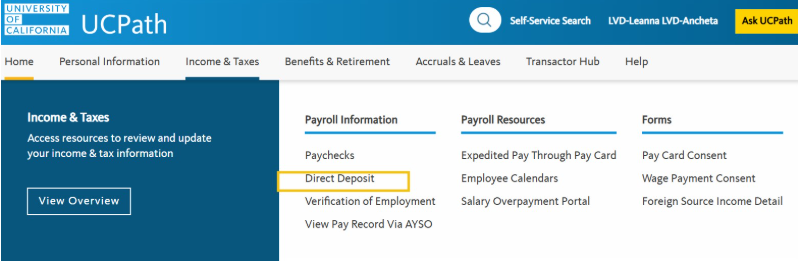
Setting Up Direct Deposit
Please note that initiation and/or changes to Direct Deposit can take up to 2 pay cycles to become effective.
Until a new/changed Direct Deposit has completed the approval process; a paper check will be issued.
Please ensure your address is current to avoid check delivery delays.
Signing up for Direct Deposit
- Go to the UCPath Online Portal and sign in.
- From the UCPath Online Portal, click on Income and Taxes, then click Payroll Information, then click Direct Deposit
- Once the required security question is answered, the system will take you to the landing page. You can view your current direct deposit information and provide you the option to cancel or add additional accounts (up to a maximum of 3 total). Follow the online instructions, but remember:
- Changes (add/update/delete) to your Direct Deposit information is allowed once per day.
- A maximum of three Direct Deposit accounts are accepted.
- The initial Direct Deposit set-up may take up to two weeks to become effective.
- Pay issued during the set-up period may result in a paper check being mailed to your address on file.
- If you experience issues with your direct deposit set-up or require additional assistance, please contact the UCPath Center at (855) 982-7284.
For more information see the UCPC Job Aid How Do I Enroll In Direct Deposit.